How to Build an Appointment Booking App
Appointment booking app development explained: web app or native, the features version one needs, realistic fixed prices and timelines, and when not to build an app at all.
Quick answer
- Web app build
- $900–$2,000 fixed at PINCLER, 10–16 days, AI-drafted with senior engineer review — the right default for most businesses
- Native mobile build
- Median $1,850 and 19 days across PINCLER's published mobile category, each AI-drafted then senior-engineer reviewed
- Core features
- Live slots, three-screen booking flow, reminders, self-service reschedule, admin calendar
- Go native when
- Push-notification loyalty, offline use or app-store presence justify the extra cost
- Skip an app when
- A configured scheduler already models your rules — start there
Appointment booking app development comes down to three decisions: what customers book (services, staff, durations), what form the app takes (mobile-first web app or native install), and what version one leaves out. At PINCLER a web-based appointment app runs $900–$2,000 fixed and ships in 10–16 days; a native mobile build sits higher, with our mobile category at a median $1,850 and 19 days across the published catalogue. Both prices rest on the same method: AI writes the first draft, senior engineers review, test and harden every release.
The form question matters more than most founders expect, because the honest default is unfashionable: a mobile-first web app. Zippia's appointment scheduling statistics report 82 percent of clients book on mobile devices — but they book through the browser link in your reminder message far more willingly than they install another app.
This guide walks the decision, the build steps, the version-one feature line and the costs, with the arithmetic shown and the vendor prices cited to their own pages.
What Does Appointment Booking App Development Involve?
Every appointment booking app is two applications sharing one database: a customer side that shows live availability and takes bookings in under a minute, and a business side where staff manage diaries, walk-in bookings and time off. Development means building both, plus the scheduling engine between them that guarantees a slot is sold exactly once.
PINCLER is an AI-first custom software development studio; we build appointment apps as part of our online booking and appointment system work using tools such as Next.js, React Native, PostgreSQL and Stripe. The stack is deliberately boring — the difficulty in this category is correctness under concurrent bookings, not novelty.
Do You Need a Native App, a Web App, or Both?
Start with the web app. It reaches every customer through a link — no install, no app-store review, one codebase — and it is meaningfully cheaper: $900–$2,000 against a native median of $1,850 in our catalogue, with faster delivery. For most service businesses the booking moment arrives via a reminder message or a search result, and a browser handles both perfectly.
Native earns its premium in three specific cases: when push notifications drive repeat bookings (gyms, salons with weekly regulars), when staff need offline access to the diary, or when app-store presence is itself part of the brand. If none of those is true today, the native app is a phase-two decision — and by then your web app's booking data will tell you whether repeat-booking behaviour justifies it.
Do customers book you weekly or monthly, repeatedly?
  NO  -> WEB APP (they arrive by link, not by icon)
  YES -> Would push notifications change behaviour
         (rebooking nudges, last-minute slots)?
           NO  -> WEB APP
           YES -> staff need offline diary access?
                    NO  -> web app now,
                           native in phase two
                    YES -> NATIVE (or both,
                           shared backend)
What Are the Build Steps?
The sequence below front-loads the scheduling engine, because it is the only part that can quietly be wrong. A disciplined run through it is 10 to 16 days for the web form of the app.
- 1. Specify the booking model on one page: services, durations, staff, hours, buffers, cancellation policy.
- 2. Model the data and the uniqueness constraints — the booking table is where double-bookings are prevented, not the UI.
- 3. Build the availability engine with a slot-hold mechanism, and test it against timezone and daylight-saving edges.
- 4. Build the customer flow: three screens from service to confirmation, guest checkout, payment or deposit where it fits.
- 5. Wire reminders — confirmation, 24 hours out, 2 hours out — each carrying the reschedule link.
- 6. Build the staff side: live calendar, manual bookings, time-off blocking, per-staff hours and buffers.
- 7. Sync to Google or Outlook calendars via a calendar and scheduling integration, deploy to the client's cloud, and only then discuss native wrappers.
What Features Belong in Version One?
Version one exists to stop revenue leaking: missed after-hours bookings, no-shows, double entry. Five features do that — live slots, the fast booking flow, automated reminders, self-service rescheduling and a staff calendar that mirrors reality. Payments or deposits join them wherever no-shows are expensive.
Everything else queues for phase two on evidence: waitlists once slots sell out, packages once pricing stabilises, push-notification loyalty once repeat behaviour shows up in the data. The full feature hierarchy, including the ones that consistently disappoint, is in our guide to appointment booking app features — worth reading before any scoping call, because feature restraint is what keeps this build inside a four-figure budget.
How Long Does It Take and What Does It Cost?
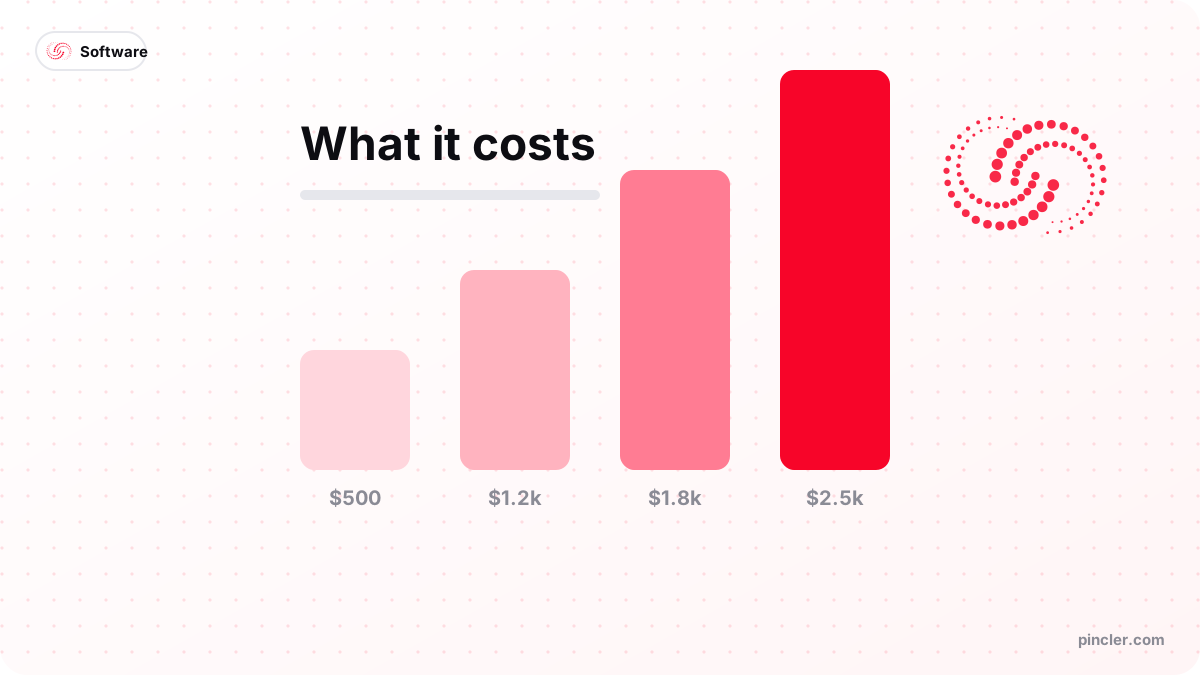
The honest ranges: 10–16 days and $900–$2,000 fixed for the web app; around 19 days at a median $1,850 for native mobile, based on PINCLER's published mobile category. Both forms sit inside the studio-wide $500–$2,500 fixed-price band — a bigger scope gets phased, never re-priced mid-build. For comparison, across all 79 builds in the published catalogue, the median build is priced at $1,450 on a 13-day quote.
Two cost guides go deeper than this section should: the appointment-specific pricing picture, including subscription alternatives, is in our appointment booking software cost breakdown, and the category-wide anatomy — what integrations, roles and payments do to any booking quote — lives in the booking system development cost guide. Between them they will get you a defensible budget before you speak to anyone.
| Build form | Fixed price at PINCLER | Typical timeline |
|---|---|---|
| Mobile-first web app | $900–$2,000 | 10–16 days |
| Native mobile app | median $1,850 (mobile category) | ~19 days median |
| Web now + native later | two phases, each ≤$2,500 | 10–16 days, then 2–3 weeks |
What Integrations Does an Appointment App Need?
Three, in almost every build. Calendar sync, so bookings land in the Google or Outlook calendars staff already check and personal events block slots automatically. A payment gateway, so deposits and prepayments clear without manual invoicing. And a messaging channel — email plus SMS or WhatsApp — so confirmations and reminders send themselves. Everything else is optional until proven otherwise.
The integration list is also where quotes quietly inflate, because each external system adds authentication, error handling and testing time. A CRM push, an accounting export or a video-call link generator are all reasonable phase-two additions; stacking them into version one is how a $1,400 appointment app becomes a $2,400 one. Scope the three essentials, ship, and let a month of real usage argue for the rest.
Who Should Build an App — and When Should You Not?
Build when appointments are your revenue and standard tools fight your rules: clinics, salons, tutors, repair shops, studios — anywhere staff, durations and buffers interact. The same architecture stretches to specialised versions like a clinic appointment and patient records system when a data layer rides on top.
Do not build when a configured scheduler already models your business — a solo consultant with fixed-length calls needs Calendly's free tier, not custom development, and we say so on scoping calls weekly. Do not start with native either just because competitors have an app icon; an unused install is more expensive shelf-ware than an unvisited web page. And if your booking rules are still changing monthly, wait — configuration absorbs churn far more cheaply than code.
What Mistakes Derail Appointment App Projects?
The recurring failures in this category are decisions, not defects — most of them made in week one and paid for in month three.
- Choosing native first for status, then discovering customers book via links, not icons.
- Treating the staff side as an admin afterthought; the paper diary wins within a month.
- Skipping the slot hold and shipping the app straight into double-booking territory.
- Requiring account creation before booking — guest checkout wins on mobile every time.
- Scoping phase-two features (loyalty, packages, AI chat) into version one until the budget doubles.
PINCLER's Perspective: How the App Gets Built
Our production model is AI-build plus senior review. AI tooling generates the boilerplate, tests and first-draft screens; senior engineers own the scheduling engine, security and release. That is the industry's direction of travel — Stack Overflow's 2025 Developer Survey found 84 percent of developers use or plan to use AI tools, with 51 percent of professionals using them daily — and across the 79 builds in PINCLER's published fixed-price catalogue, the tool counts tell the same story: GPT on 76 projects, Cursor on 75, Claude Code on 63.
The economics land with the client: fixed quotes in writing before work starts, delivery in days rather than quarters, code in the client's own GitHub with a 14-to-60-day bug-fix warranty. The full 79-build catalogue — including the mobile and booking categories this article's numbers come from — is published at our research page.
The Bottom Line
Appointment booking app development is three decisions done in the right order: model the booking rules, default to a mobile-first web app, and hold the version-one line at the five features that stop revenue leaking. Expect $900–$2,000 and a fortnight for the web form, and let real booking data — not fashion — decide whether native ever earns its slot in phase two.
Related PINCLER builds
Frequently asked
How much does appointment booking app development cost?
A mobile-first web appointment app costs $900–$2,000 fixed at PINCLER and ships in 10 to 16 days. Native mobile builds sit higher — our published mobile category lists a median $1,850 and 19 days, all AI-drafted then reviewed, tested and hardened by senior engineers. Both stay inside the $500–$2,500 fixed-price ceiling; larger scopes are split into phases. Subscription schedulers are the cheaper alternative when your rules are standard, from $0–$16 a month at the time of writing.
Should an appointment booking app be native or web-based?
Web-based, for most businesses. Customers reach booking through links in reminders and search results, and Zippia reports 82 percent book on mobile — where a responsive web app works without an install. Native becomes worth its premium when push notifications drive repeat bookings, staff need the diary offline, or app-store presence matters to the brand. A shared backend lets you add native later without rebuilding.
How long does it take to develop an appointment booking app?
Ten to sixteen days for a web-based appointment app at PINCLER, covering the availability engine, customer flow, reminders, payments and the staff calendar. Native mobile versions run around 19 days at the median in our published catalogue. Traditional agency timelines of three to six months for comparable scope reflect team coordination overhead; AI-assisted software development for startups compresses the hours, while senior review keeps the correctness.
Can an appointment app handle multiple staff members?
Yes — per-staff diaries, working hours, buffers and services are standard scope inside the $900–$2,000 band, which AI-drafted code and senior engineering review keep affordable. Each staff member gets their own calendar and time-off control, customers can pick a person or take the soonest available, and the engine prevents any slot being sold twice. When rooms or equipment also constrain bookings, you are entering multi-service platform territory, which prices towards the top of the band.
What keeps customers actually using a booking app?
Speed and self-service, not features. A booking completed in under a minute, reminders that arrive reliably, and a reschedule link that works at 11pm are what customers reward with repeat use. Guest checkout matters more than any loyalty scheme in version one. Push notifications help only for genuinely recurring relationships — which is exactly the data your web app should gather before you pay for a native build.
Who owns the code after an appointment app is built?
The client should, without negotiation. At PINCLER every build is delivered into the client's own GitHub repository and deployed to their own cloud and database accounts, with a bug-fix warranty of 14 to 60 days included. That means no lock-in: any developer can maintain or extend the app later. Treat any builder who keeps the repository, the hosting or the data as a red flag before signing.
Want to build this?
PINCLER builds custom software, AI agents and GTM systems for a fixed price between $500 and $2,500, delivered in 3–30 days, with the code owned by you.
Keep reading
Related articles
What Does a Booking App With WhatsApp Notifications Cost?
A booking app with WhatsApp notifications costs $900–$2,500 fixed price — AI-drafted, senior-reviewed — plus per-message Meta fees. How WhatsApp billing works and what to budget.

How Much Does a Telegram Mini App Cost to Build?
Telegram Mini App development cost: $500–$2,500 fixed price — AI-drafted, senior-reviewed — against agency guides of $10,000–$80,000. What that buys and what it does not.
How to Build an Online Booking System
How to build an online booking system: the six core components, a step-by-step build plan, realistic timelines, and when a SaaS scheduler is the smarter choice.